





Skip to content

LIFETIME BUNDLE - ONE TIME PAYMENT - SAVE 61%

Pixolette – WordPress Plugins

Pixolette - WordPress Plugins

  • Home
  • Plugins
  • Bundles
  • Support
  • Blog
  • Contact Us
Shopping Cart 0
Pixolette – WordPress Plugins
Pixolette - WordPress Plugins

Varvara Docs

⌘K
  • Getting Started
    • Installing the Theme
    • Activating the Theme
    • Installing the Plugins
    • Adding Demo Content
    • Using a Child Theme
  • Homepage
    • Choosing the Layout
    • Choosing the Header Image
  • Pages and Content
    • Page Templates
    • Default Post Layout
    • Post Templates
    • Post Options
    • Customizing the 404 Page
  • Header and Footer
    • Adding the Logo
    • Adding the Navigation
    • Header Layout & Options
    • Footer Options
  • Ad Areas & Widgets
    • Ad Areas
    • Widgets
  • Design & Style
    • Style Guide
    • Custom CSS
  1. Home
  2. Docs
  3. Varvara Docs
  4. Pages and Content
  5. Page Templates

Page Templates

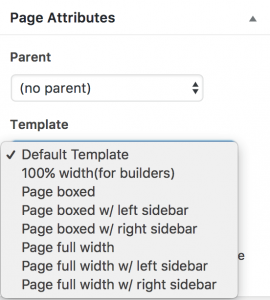
Varvara Theme comes with 7 page templates:

  1. Page boxed
  2. Page boxed with Left Sidebar
  3. Page boxed with Right Sidebar
  4. Page full width
  5. Page full width with Left Sidebar
  6. Page full width with Right Sidebar
  7. Page 100% width – for builders

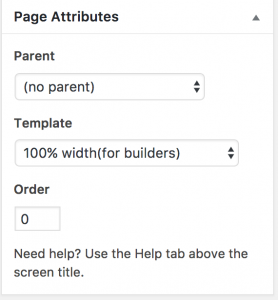
When creating/editing the page, you can choose the page template:
 

Tags blog, blogging theme, theme, varvara, wordpress

Doc navigation

Default Post Layout →
Still stuck? How can we help?
Updated on April 17, 2018
Was this article helpful to you? No Yes

How can we help?

WordPress Plugins that work!

Shop

  • One Time File Download
  • Magic Link Login
  • Secure File Transfer
  • Jobs Board
  • WooCommerce Grid Builder

Help

  • Contact Us
  • Documentation
  • FAQ
  • Refund Policy

More Information

  • About Pixolette
  • Privacy Policy
  • Terms of Service
  • Blog

© 2026 Pixolette - WordPress Plugins

Facebook X Instagram
  • Home
  • Plugins
  • Bundles
  • Support
  • Blog
  • Contact Us
Search